Color? Or Black & White?

Since the advent of color film, photographers were left with the choice of shooting in color or black and white.  Today is no different, even with the advancement of digital photography.  Many digital cameras have a Black & White or “monochrome” feature.

It’s true that some photographs have more impact in black and white than in color, but should you utilize your digital camera’s monochrome setting and shoot directly in black and white?

Many photographers will tell you….No!

Don’t panic!  Take a breath!  It’s ok!

This is actually a good suggestion.  Shooting in color leaves you with more options in post production than shooting in black and white.  You can use selective color mixed with black and white, sepia tone, or any other tone you can think of.  Not to mention, it’s easier to convert a color photograph to black and white than it is to colorize a black and white photograph!

So, folks, when it doubt, shoot in color and convert to black and white later.  But remember, if you are going to convert an image to black and white, make sure you save the black and white image as a new file.  Always keep the original color image intact!

Until next time….

[^_^]

~A.M.

Creating A Watermark

One of the first things any photographer or artist should do before posting an image of their work online is create a watermark bearing the copyright symbol and the artist/photographer‘s name/logo.

This is a rather simple process you can do in Photoshop in less than two minutes once you get the hang of it.  I’ll guide you, step by step through the process I use.

* First, create a brush.  This can be your logo, the copyright symbol with your business name, or the copyright symbol with your name.  This is a one-time step.  Once you name and save your brush, you’ll be able to go straight to the next step the next time you have an image to watermark.  Huzzah!

* Second, open your selected image and resize it for use on the internet.  A smaller image with a smaller resolution is good to not only keep loading time low but also discourage theft by making any enlargement of the image pixilated.

* Third, create a new layer.  A NEW layer, not a duplicate of the original layer, a NEW layer.

* Fourth, on the new layer, use your newly created brush in black.  The size of the brush is up to you, just make sure it’s big enough to be legible!

* Fifth, apply the “emboss” filter to this layer.  You can play around with how pronounced you want the shadow of your watermark to be by changing the angle, height, and amount settings.  Typically, I use an angle of 180, a height of 3 pixels, and an amount of 80%.  Experiment until you find something you’re happy with.

* Sixth, go to the “layers” palette and set the blending mode to either “soft light”, “hard light”, or “vivid light” depending on how pronounced you want your watermark to be.  I typically go with “hard light” as my watermark blending mode.

* Finally, save your image as a new file.  This step is important or you’ll end up losing your original file, but you folks are smart cookies so I’m sure you already know this!  But, when saving your image, make sure you choose a medium to low quality.  Something under 100kb is best.  Again, this is to discourage theft by making any enlargements of the image too pixilated to be of any use.

If you look through any of my galleries, you’ll see the watermark I created for myself.  It’s not a bad idea to create other brushes to use in this process for when you get bored with the first one.

Good luck, and happy watermarking!

Until next time….

[^_^]

~A.M.

When Awesome Things Happen

I love it when awesome things happen.  Let me set the scene for you, folks.

Yesterday, (Sunday, March 18 for those of you not following along) I went on a little trip to Quoddy Head State Park (in Lubec Maine) with my parents for a day of hiking and photography.  Two of my favorite things.

In the middle of this hike, my parents and I took a moment to sit on some rocks by the ocean.  The tide was just starting to come in, and the surf was a bit choppy, so there were waves crashing and water spraying left and right.  Now, usually when I try to photograph crashing waves I watch a few awesome spectacles then when I lift my camera, what happens?  The water calms and no waves form.  Then, when I put my camera down, things start up again.  This is where infinite patients comes into play.

But yesterday, either the stars aligned or Poseidon was working with me, whatever the case was, I didn’t have to wait long for an interesting display to kick up.  I saw a massive wave heading toward some rock formations, and mind you, I was rather close to the shoreline, but instead of backing down, I lifted my camera.

This, my friends, was the shot I took away.


Now, after another mile or so of hiking, my parents and I took another break on a rock outcropping.  Again, by some miracle, I looked up at just the right moment and saw one of our country’s most majestic creatures.  A bald eagle.  A bald freaking eagle, folks!  I don’t know about you, but I get excited when I see a bald eagle in the wild.  I’ve managed to catch a picture of one a year or two ago, but I still get that feeling of utter awe when I spot a bald eagle soaring in the air.  And yes, I managed to get a picture of it, but unfortunately, it was as the eagle was flying away from me and I doubt said eagle would appreciate having its backside posted on the internet!  Regardless, it was awesome to see an eagle.  Did I mention it was awesome?  I did?! Ok!

I just love it when awesome things happen.

Until next time…

[^_^]

~A.M.

A Camera Bag Alternative?!

While there’s really no alternative to an extensive and well stocked camera bag for a highly involved shoot, there is a way to eliminate the need for a camera bag completely on a short trip be it across the street or across the country.

Enter TEC®, also known as SCOTTEVEST®.

What the heck is that?!  So glad you asked!  TEC® (“Technology Enabled Clothing“), or SCOTTEVEST®, is an amazing revolution in clothing.  One simple vest can hold the entire contents of a typical camera bag and still have room for more goodies!  And it doesn’t stop at vests.  There are jackets, pants, hoodies, and hats!  There are even boxers that have pockets to tote your valuables (and I‘m not talking family jewels here, folks.  Come on! Get your mind out of the gutter!)!

I bought a travel vest from SCOTTEVEST® about a year ago and it’s awesome.  There’s room in this vest for everything from the usual pens, keys, ID, and cell phone to an iPad and even a laptop!  And it looks nothing like the traditional photographer’s vest with all the pockets and compartments visible on the exterior of the vest.  Everything’s inside, hidden, and balanced perfectly.  Trust me, this clothing line is amazing.

Don’t believe me?  Don’t want to take my word for it?  No problem! Go check out the SCOTTEVEST® site for yourself!  You’ll be glad you did.

Until next time…

[^_^]

~A.M.

Beauty In The Mundane

Have you ever stopped and stared at a common object, or common occurrence in nature, suddenly seeing it in a new and different way?  Maybe you’ve been walking along with someone when this happens and they look at you as if you’ve lost your marbles.  Yeah, I know what that’s like!

Photographers and artists tend to see things around them just a little differently than the average, not so creatively inclined individual.  They call this “seeing beauty in the mundane.”  Just who “they” are, I couldn’t say, but you know what I mean.

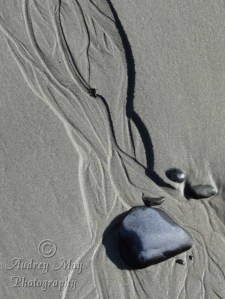
Take this photo for example

Most people walking along the beach wouldn’t give this a second look, but there was something about it that caught my eye.  I tend to look for patterns and images like this when I’m at the beach.  I know it seems odd that I’m talking about the beach in early March, but living only a few miles away from the ocean, I’m a year round beach goer.

Obviously, this is just a small example of finding beauty in the mundane.  Everything has it’s own individual beauty, just like people.  Trust me, beauty is all around you, some of it obvious, some of it you just have to look for.

Until next time…

[^_^]

~A.M.